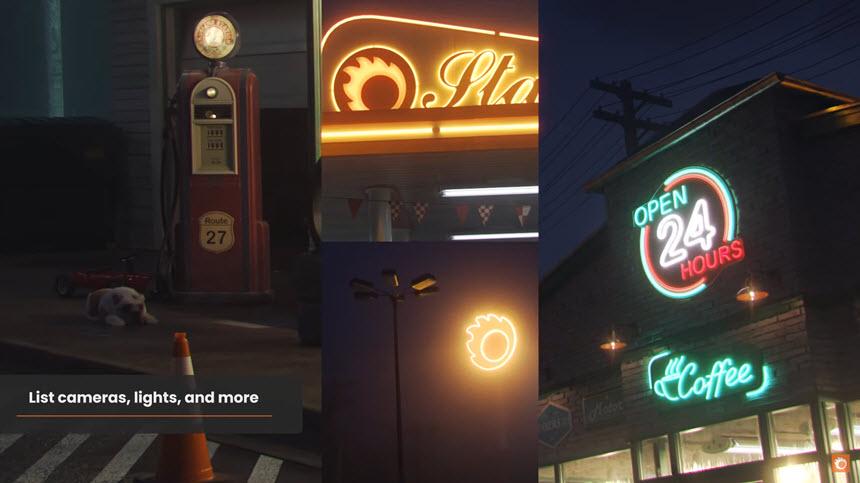
Chaos Corona 12 Update 1 is a CPU-based photorealistic rendering plugin for Autodesk 3ds Max (versions 2016–2025) developed by Chaos. Widely adopted in architectural visualization (ArchViz), interior design, and product rendering, it integrates directly inside the 3ds Max interface so artists can configure lighting, materials, shadows, and camera settings with minimal setup. Evaluating a free trial lets 3D artists and visualization studios test render speed, interactive feedback, and scene compatibility before committing to a subscription.
Why Architects & Interior Designers Use Chaos Corona
- Fast Learning Curve & Artist-Friendly Workflow: Built around predictable lighting and physically plausible shading so designers spend less time tuning complex render settings and more time refining scenes.
- Proudly CPU-Based & Predictable: Runs reliably on standard multi-core CPUs without requiring specialized GPU hardware, while supporting distributed rendering across multiple machines.
- Deep 3ds Max Integration: Works smoothly with native 3ds Max lights, geometry, modifiers, and scene converters—including tools to convert V-Ray materials and render settings into Corona workflows.
What's New in Chaos Corona 12 & Update 1
- Corona to Vantage Live Link: Stream scenes directly to Chaos Vantage for real-time GPU exploration, camera scouting, and fast preview renders alongside CPU production rendering.
- Chaos Cloud Collaboration & Virtual Tours: Share renders directly from the Virtual Frame Buffer (VFB 2) to gather client markups and build interactive panoramic virtual tours.
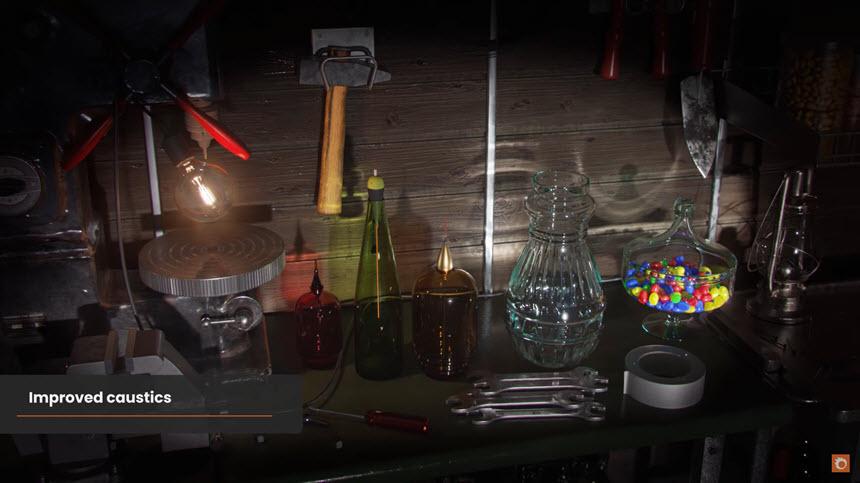
- Faster Caustics & Volumetric Caustics: Improved caustic rendering speed with separate surface and volume intensity multipliers for light passing through glass, water, or smoke.
- Auto Exposure, Auto White Balance & AI Upscaling: Jump-start lighting balance automatically and speed up test renders and Interactive Rendering (IR) previews.
- VFB 2, Curved Decals & Pattern Improvements: Compare multiple LightMix setups in a single render, wrap decals cleanly onto curved surfaces, and define Corona Pattern crop boxes using scene geometry.
Core Features & Workflow Tools
Feature CategoryPractical CapabilitiesPhotorealistic CPU RenderingDeliver biased or unbiased photorealistic renders with interactive light adjustments (LightMix) even after rendering completes.Corona Material Library & Chaos CosmosAccess ready-to-use material presets and hundreds of 3D assets—including furniture, vegetation, people, and lights—directly inside 3ds Max.Chaos Scatter & Instance BrushDistribute trees, grass, rocks, and props across surfaces with distribution presets, edge trimming, and brush refinement.Corona Tiles & Corona MultimapCreate procedural tiled surfaces with customizable layout and grout controls, and blend or randomize multiple texture maps across objects.Corona Image Editor (CIE)Adjust exposure, tone mapping, LUTs, bloom, glare, and LightMix passes on saved renders without reopening 3ds Max.Distributed Rendering & EcosystemScale render speed across network nodes and pair seamlessly with tools like Chaos Phoenix and Chaos Scans.
Frequently Asked Questions (FAQ)
- Which versions of 3ds Max does Chaos Corona 12 Update 1 support? It supports Autodesk 3ds Max 2016 through 2025 on 64-bit Windows, with a CPU supporting SSE 4.2 or newer.
- Where is the Corona Material Library located in Corona 12 Update 1? In Corona 12 Update 1, the Material Library was separated from the main installer and integrated into Chaos Cosmos (or downloaded on demand when opening the Material Library inside 3ds Max) to keep the base installer lighter.
- How can I test Chaos Corona before buying a license? Chaos provides an official 30-day free trial that lets you test full rendering features, Chaos Cosmos assets, and VFB tools on your own 3ds Max scenes.
How to Download & Evaluate Safely
- Use Official or Authorized Sources: Download the installer directly from Chaos’s official portal (
[chaos.com/corona/download](https://chaos.com/corona/download)) or an authorized reseller to ensure file integrity and valid trial activation. - Check 3ds Max & CPU Compatibility: Confirm that you are running a supported version of 3ds Max (2016–2025) on 64-bit Windows with an SSE 4.2-compatible processor.
- Download Material Assets via Chaos Cosmos: After installing the plugin, sign in with your Chaos account to access the Material Library and Chaos Cosmos assets during your trial.
Screen Shorts