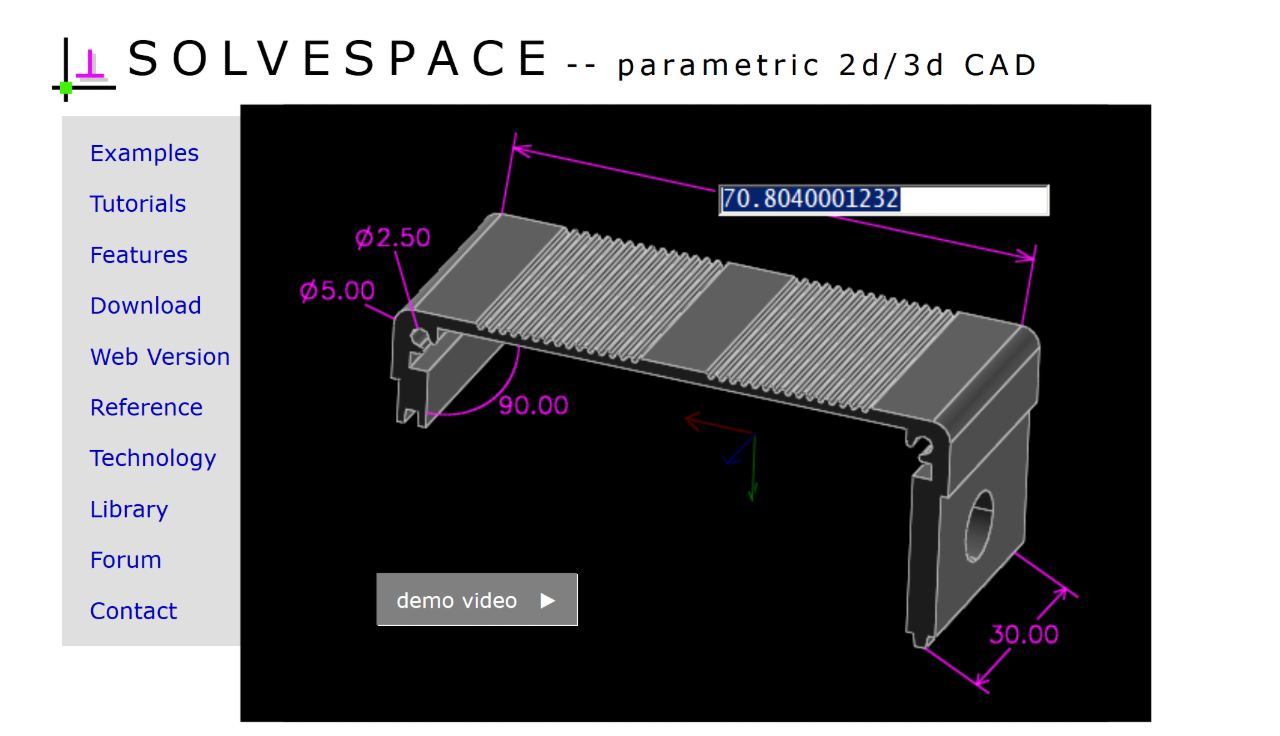
SolveSpace 3.3 (released under the GNU General Public License v3) is a fast, lightweight, open-source parametric 2D and 3D CAD application built around a built-in geometric constraint solver. Packing solid modeling, planar/spatial mechanism simulation, 2D sheet-metal/laser-cutting layouts, and multi-part assemblies into a compact ~9 MB–13 MB standalone binary, SolveSpace 3.3 is ideal for mechanical engineers, makers, and educators who want instant startup and clean constraint-driven CAD without heavy system overhead.
1. In-Depth Review: Why Mechanical Engineers & Makers Use SolveSpace 3.3
- Ultra-Lightweight Standalone Executable & Browser WebAssembly Option: Runs directly from a single ~9.1 MB executable on Windows (no installation required), a ~12.5 MB `.dmg` on macOS, or a ~1 MB offline WebAssembly build in modern web browsers.
- Built-In Geometric Constraint Solver & Mechanism Simulation: Solves 2D and 3D constraints (distances, angles, tangency, symmetry, equal lengths, point-on-curve) in real time, letting engineers simulate planar or spatial linkages with pin, ball, and slide joints.
- Improved Surface Stability & Constraint Convergence in SolveSpace 3.3: The October 2026 v3.3 release strengthens NURBS/flat/curved surface booleans, resolves tangent edge intersections, and improves solver convergence on large dimensions.
2. Key Features & Capabilities
- Parametric 3D Solid Modeling: Build 3D parts using sketch extrusions, revolves, helixes, and exact Boolean operations (`union`, `difference`, `intersection`).
- 2D Section & Laser-Cutting / CNC Drafting: Draw constrained 2D profiles and export clean `.DXF`, `.SVG`, `.EPS`, and `.PDF` files for laser cutting, waterjet, or 2D fabrication.
- Multi-Part 3D Assemblies & Kinematic Linkages: Link multiple `.slvs` part files into a single assembly, constrain mating surfaces/axes, verify fit, and drag joints to test mechanical motion.
- OpenMP Multi-Core Acceleration: Uses OpenMP multi-threading on Windows, macOS, and Linux to accelerate complex Boolean operations and mesh generation.
- Broad 2D & 3D CAD Export Interoperability: Exports `.STL` and `.OBJ` triangle meshes for 3D printing, `.STEP` / NURBS surfaces for downstream CAD exchange, and `.DXF`/`.SVG`/`.PDF` vector drawings.
- Zero Licensing Cost & Offline Privacy: 100% free under GPLv3 with zero cloud lock-in, telemetry, or subscription fees.
- Official Links: Free Trial, Free / Education & Pricing
Always download SolveSpace executables, source code, and official manuals directly from SolveSpace's official portals:
- Official SolveSpace Website: https://solvespace.com/
- Official SolveSpace Downloads (v3.3 Windows, macOS & Linux): https://solvespace.com/download.pl
- Official SolveSpace Experimental Web Version: https://solvespace.com/webver.pl
- Official GitHub Repository & Releases: https://github.com/solvespace/solvespace/releases
4. Step-by-Step Installation Guide
- Verify Operating System & Hardware: Confirm your computer runs Windows (Vista through Windows 11, 64-bit or 32-bit), macOS, or Linux with OpenGL graphics support and at least 2 GB–4 GB RAM.
- Download the Official SolveSpace 3.3 Build: Visit https://solvespace.com/download.pl and download `solvespace_x64.exe` (multi-core OpenMP build for Windows), `SolveSpace.dmg` for macOS, or install via your Linux distribution's package manager / Snap Store (`snap install solvespace`).
- Run Directly (Portable on Windows) or Drag to Applications: On Windows, no installer wizard is needed—simply save `solvespace_x64.exe` in a convenient folder and double-click to launch (install Microsoft Visual C++ Redistributables if prompted, or use `solvespace_single_core_x64.exe`); on macOS, drag `SolveSpace.app` into `/Applications`.
- Verify Viewport & Constraint Solver: Open SolveSpace, test drawing a closed rectangle on the default XY workplane, and verify smooth pan (right-drag), rotate (middle-drag), and zoom (mouse wheel) controls.
5. How to Use SolveSpace 3.3: Beginner Workflow
- Sketch a Closed 2D Profile: Open SolveSpace, select `Sketch > Rectangle` or `Sketch > Line Segment` (`S`), and draw a closed contour on the active workplane.
- Apply Geometric & Dimensional Constraints: Select a line segment (`click` until it turns red) and press `D` (`Constrain > Distance / Diameter`) to lock exact millimeter/inch dimensions until degrees of freedom (`DOF`) reach `0`.
- Extrude or Revolve into a 3D Solid: Select `New Group > Extrude` (or `Lathe` for revolved parts), drag the extrusion arrow to set thickness, and constrain the extrusion depth.
- Add Hole Cutouts via Boolean Difference: Select a flat face on your 3D block, click `New Group > Sketch in New Workplane`, draw a circle, and extrude it in `Difference` mode to cut a through-hole.
- Export for 3D Printing, CAD, or Laser Cutting: Save your parametric model (`File > Save` as `.slvs`), then choose `File > Export Triangle Mesh` (`.STL`) for 3D printing, `File > Export 2D View` (`.DXF`/`.SVG`/`.PDF`), or `File > Export Surfaces` (`.STEP`).
6. Frequently Asked Questions (FAQ)
- Is SolveSpace 3.3 completely free for commercial engineering and manufacturing?Yes. SolveSpace is 100% free and open-source software licensed under the GNU General Public License v3 (GPLv3), allowing unrestricted personal, educational, and commercial product design.
- Does SolveSpace require installation on Windows?No. On Windows, SolveSpace distributes as a single portable ~9.1 MB `.exe` file that runs immediately without registry changes or heavy installers.
- Can SolveSpace export STEP and STL files for CNC and 3D printing?Yes. SolveSpace exports watertight `.STL` triangle meshes for 3D printing, `.STEP` NURBS surfaces for CAD interoperability, and `.DXF`/`.SVG`/`.PDF` files for 2D laser cutting.