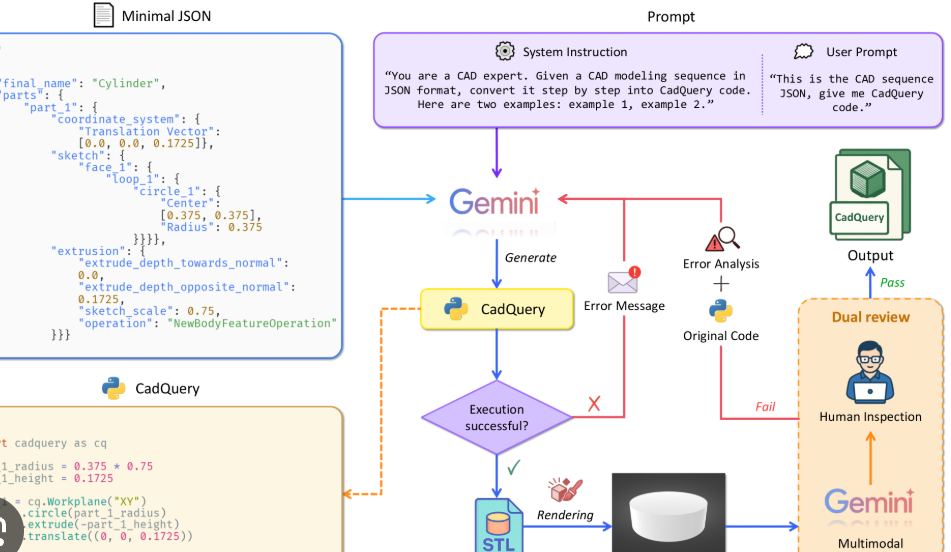
CadQuery (maintained by the CadQuery open-source community under the Apache-2.0 open-source license) is a Python-based parametric 3D CAD scripting library built on the Open CASCADE Technology (OCCT) B-Rep geometry kernel. Designed for mechanical engineers, hardware developers, 3D printing makers, and computational designers, CadQuery lets you write clean, human-readable Python code to construct exact solid models, multi-part assemblies, fillets, chamfers, lofts, and sweeps—exporting directly to industry-standard `STEP`, `STL`, `IGES`, `DXF`, `BREP`, and `SVG` formats alongside live visual inspection in `CQ-Editor` or JupyterLab.
1. In-Depth Review: Why Engineers & Code-CAD Makers Use CadQuery
- True B-Rep Solid Modeling with Native `STEP` Export (Unlike Mesh-Only Code CAD): Powered by Open CASCADE (`OCCT`), CadQuery creates mathematically exact curves, fillets, chamfers, and NURBS surfaces—exporting clean `STEP` files ready for CNC machining, injection molding, and SOLIDWORKS/FreeCAD collaboration rather than faceted triangles alone.
- Fluent Python Selector API & Full Python Ecosystem Access: Uses intuitive chainable selectors (`faces(">Z")`, `edges("|Z")`, `vertices()`) to pick geometric features without fragile coordinate math, while letting you import NumPy, SciPy, or CSV data tables to drive parametric part families.
- Interactive Live Preview via `CQ-Editor` & `cadquery-massembly`: Pairs with the dedicated `CQ-Editor` desktop GUI and Jupyter widgets so every script save updates the shaded 3D B-Rep viewport, constraint-solved assemblies, and mass/volume checks immediately.
2. Key Features & Capabilities
- Parametric B-Rep 3D Solid & Assembly Modeling: Build sketches, extrusions, revolutions, lofts, sweeps, shells, fillets, chamfers, and constraint-based multi-part assemblies in standard Python 3.
- Topological Feature Selectors (`Workplane` API): Select faces, edges, wires, and vertices dynamically by direction, type, area, or proximity—keeping models resilient when dimensions change.
- Native CAD & Manufacturing Exports (`STEP`, `STL`, `DXF`, `BREP`, `SVG`): Export high-precision `STEP` assemblies for engineering, watertight `STL`/`3MF` meshes for 3D printing, and 2D `DXF`/`SVG` profiles for laser cutting.
- `CQ-Editor` Interactive IDE & Jupyter Notebook Support: Inspect 3D models, debug selection highlights, measure distances, and reload scripts automatically on save.
- FreeCAD & VS Code Ecosystem Integration: Runs standalone via Conda/pip, inside `CQ-Editor`, or embedded within FreeCAD and VS Code extensions.
- 100% Free & Open-Source (Apache-2.0 License): Free to use, modify, and distribute in personal, academic, and commercial engineering projects.
- Official Links: Free Trial, Free / Education & Pricing
Always install CadQuery and `CQ-Editor` directly from official CadQuery portals and package channels:
- Official CadQuery Documentation & Tutorials: https://cadquery.readthedocs.io/
- Official CadQuery GitHub Repository & Releases: https://github.com/CadQuery/cadquery
- Official `CQ-Editor` GUI GitHub Repository: https://github.com/CadQuery/CQ-editor
- Official CadQuery Conda-Forge Channel: https://anaconda.org/conda-forge/cadquery
4. Step-by-Step Installation Guide
- Check Operating System & Python/Conda Requirements: Confirm your 64-bit Windows, macOS (Intel or Apple Silicon), or Linux workstation has Miniforge/Conda (recommended for pre-compiled Open CASCADE binaries) or Python 3.10–3.12 installed.
- Create a Dedicated Conda Environment & Install CadQuery: Open your terminal and run `conda create -n cq -c conda-forge cadquery cq-editor` (or install the library via `pip install cadquery`).
- Activate Environment & Launch `CQ-Editor`: Run `conda activate cq` followed by `cq-editor` to open the graphical CadQuery IDE.
- Verify Installation with a Quick Test Script: Confirm the 3D viewport renders cleanly and exports a test `.step` file without missing-library errors.
5. How to Use CadQuery: Beginner Workflow
- Define Parametric Dimensions in Python: Open `CQ-Editor` (or VS Code) and declare key variables at the top of your script (`length = 80.0`, `width = 50.0`, `thickness = 10.0`, `hole_dia = 8.0`).
- Construct Base Solid & Cut Features Using Selectors: Chain `Workplane` operations to build and drill your part:
`result = cq.Workplane("XY").box(length, width, thickness).faces(">Z").workplane().rect(60, 30, forConstruction=True).vertices().hole(hole_dia)`
- Add Engineering Fillets & Chamfers: Select vertical outer edges (`result = result.edges("|Z").fillet(4.0)`) to round corners parametrically.
- Preview & Inspect in `CQ-Editor`: Press `F5` (Render) in `CQ-Editor` to inspect the shaded 3D model, check bounding dimensions, and verify face/edge selections.
- Export to `STEP` or `STL`: Add `cq.exporters.export(result, "mounting_plate.step")` and `cq.exporters.export(result, "mounting_plate.stl")` to generate production CAD and 3D-printing files automatically.
6. Frequently Asked Questions (FAQ)
- Is CadQuery completely free for commercial product design and manufacturing?Yes. CadQuery is free and open-source software licensed under the permissive Apache License 2.0 with zero licensing fees.
- How does CadQuery compare to OpenSCAD?OpenSCAD uses its own domain-specific language and relies on faceted mesh (`CSG`) geometry (`STL`), whereas CadQuery uses full Python 3 with an Open CASCADE `B-Rep` kernel capable of true curved surfaces, edge fillets, and native `STEP` export.
- Can I open CadQuery `.step` files in FreeCAD, SOLIDWORKS, or Fusion?Yes. Because CadQuery exports standard ISO `STEP` (`AP214`/`AP203`) solid models, any desktop CAD suite can open, measure, assemble, and machine them directly.