Trimble Tekla Structures 2026 is a constructible structural Building Information Modeling (BIM) software platform developed by Trimble for structural engineers, steel detailers, precast concrete detailers, fabricators, and general contractors. Designed to create high-detail, fabrication-ready 3D structural models across steel, cast-in-place concrete, precast concrete, and timber, Tekla Structures connects design intent directly to workshop fabrication, CNC machinery, and construction site execution.
1. In-Depth Review: Why Structural Engineers & Detailers Use Tekla Structures
- Constructible Level-of-Detail Structural Modeling: Builds accurate 3D models containing steel profiles, bolts, welds, reinforcing bars (rebar), embedments, and assemblies suitable for real fabrication and erection.
- Automated Fabrication & General Arrangement Drawings: Generates associative shop drawings, assembly/single-part drawings, rebar bending schedules, and material takeoffs that stay synchronized when the 3D model changes.
- Open BIM & Multi-Discipline Collaboration: Exchanges IFC, DWG/DXF, NC/DSTV, and CIS/2 files cleanly and connects with Trimble Connect, Revit, Civil 3D, and structural analysis software.

2. Key Features & Capabilities
- Structural Steel & Connection Detailing: Model beams, columns, trusses, stairs, handrails, and parametric steel connections with automated clash checking and bolt/weld scheduling.
- Reinforced & Precast Concrete Detailing: Place 3D rebar sets, meshes, strands, and precast embeds with automated bar bending schedules and cast-unit drawings.
- Simultaneous 3D Model & Drawing Editing: Edit 3D structural models and general arrangement (GA) drawings side by side with live synchronization of annotations and dimensions.
- AI-Assisted Cloud Fabrication Drawings & Assistants: Speed up fabrication drawing creation with AI-assisted template matching and built-in Trimble Assistants for model navigation and productivity.
- Multi-User Collaboration & Trimble Connect Integration: Coordinate multi-user project teams, track fabrication/erection status, and share constructible models in the cloud.
- CNC & Production Data Export: Export NC/DSTV files for steel fabrication machinery, BVBS for rebar bending, and IFC models for BIM coordination.
- Official Links: Free Trial, Free / Education & Pricing
Always download Tekla Structures installers, environments, and trial licenses through Trimble's official portals:
- Official Tekla Structures Overview: https://www.trimble.com/en/products/tekla-structures
- Official Free Trial (30-Day Evaluation): https://download.trimble.com/tekla-structures/free-trial
- Free / Education (Tekla Campus for Students & Educators): https://campus.tekla.com/
- Documentation & Hardware Guidelines: https://help.trimble.com/tekla-2026/tekla-structures
4. Step-by-Step Installation Guide
- Verify Operating System & Hardware: Confirm your workstation runs 64-bit Windows 11 with a modern Intel Core i7/i9 or equivalent AMD processor, at least 16 GB RAM (32 GB+ recommended for large structural models), a dedicated NVIDIA GeForce RTX / professional GPU, and NVMe SSD storage.
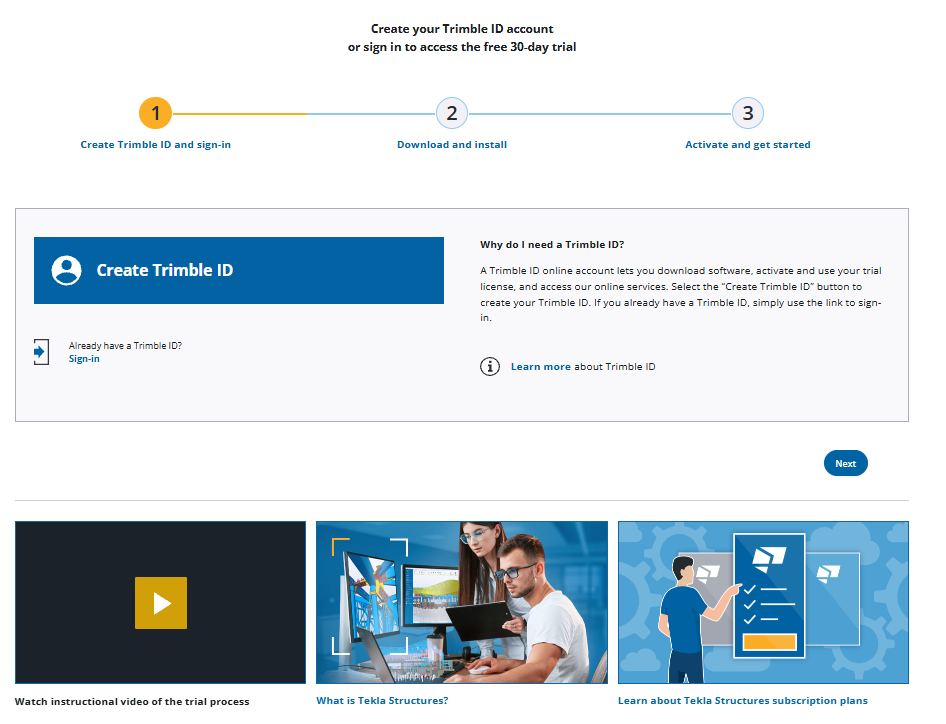
- Create a Trimble ID & Start Trial: Visit https://download.trimble.com/tekla-structures/free-trial, sign in with or create a free Trimble ID, and complete your online profile to activate the 30-day free trial.
- Download Tekla Structures & Regional Environment: Download the Tekla Structures 2026 application installer along with your regional Tekla Environment package (such as Default, US, UK, Eurocode, or Asia environments) and run the installers with administrator privileges.
- Launch & Select Role / Configuration: Open Tekla Structures, sign in with your Trimble ID, choose your Environment, Role (such as Steel Detailer, Concrete Detailer, or Engineer), and Configuration, and start modeling.
5. How to Use Tekla Structures: Beginner Workflow
- Create a New Model & Set Up Grids: Launch Tekla Structures, click `New`, name your structural project, and customize the 3D coordinate grid lines (`X`, `Y`, `Z` elevations) to match your structural layout.
- Place Primary Columns & Beams: Use the `Steel` or `Concrete` ribbon tabs to place columns on grid intersections and frame primary/secondary beams with defined profiles and material grades.
- Apply Connections & Reinforcing Bars: Open the `Applications & components` catalog (`Ctrl+F`) to add parametric base plates, shear tabs, moment connections, or 3D rebar sets.
- Run Clash Check & Numbering: Run `Clash Check Manager` to resolve bolt/member interferences and run `Numbering` (`Perform numbering`) so identical parts and assemblies share accurate marks.
- Generate Drawings & Material Reports: Open `Document Manager` (`Ctrl+L`) to create General Arrangement (GA), Assembly, or Single-Part drawings and export Bill of Materials (BOM) reports or `.IFC` files.
6. Frequently Asked Questions (FAQ)
- How long is the official Tekla Structures free trial?Trimble provides a 30-day free trial for individual professionals via https://download.trimble.com/tekla-structures/free-trial, while students and educators can access Tekla Campus for free.
- Does Tekla Structures 2026 run on macOS or Linux?No. Tekla Structures 2026 requires 64-bit Windows 11 and does not run natively on macOS, Linux, or Windows ARM.
- What is the difference between Tekla Structures and Tekla Structural Designer?Tekla Structural Designer focuses on structural analysis and code-based engineering design, whereas Tekla Structures focuses on constructible 3D BIM detailing, fabrication drawings, and construction execution.