Adobe Acrobat Pro (developed by Adobe Inc. as part of Adobe Document Cloud and Creative Cloud) is the industry-standard desktop, web, and mobile PDF authoring, editing, Optical Character Recognition (OCR), and electronic signature platform for Windows and macOS. Built for engineers, surveyors, legal teams, administrators, and publishing professionals, Acrobat Pro turns scanned documents, CAD/GIS map exports, and Microsoft Office files into searchable, editable, password-protected, and legally signable PDF deliverables.
1. In-Depth Review: Why Professionals & Technical Teams Use Adobe Acrobat Pro
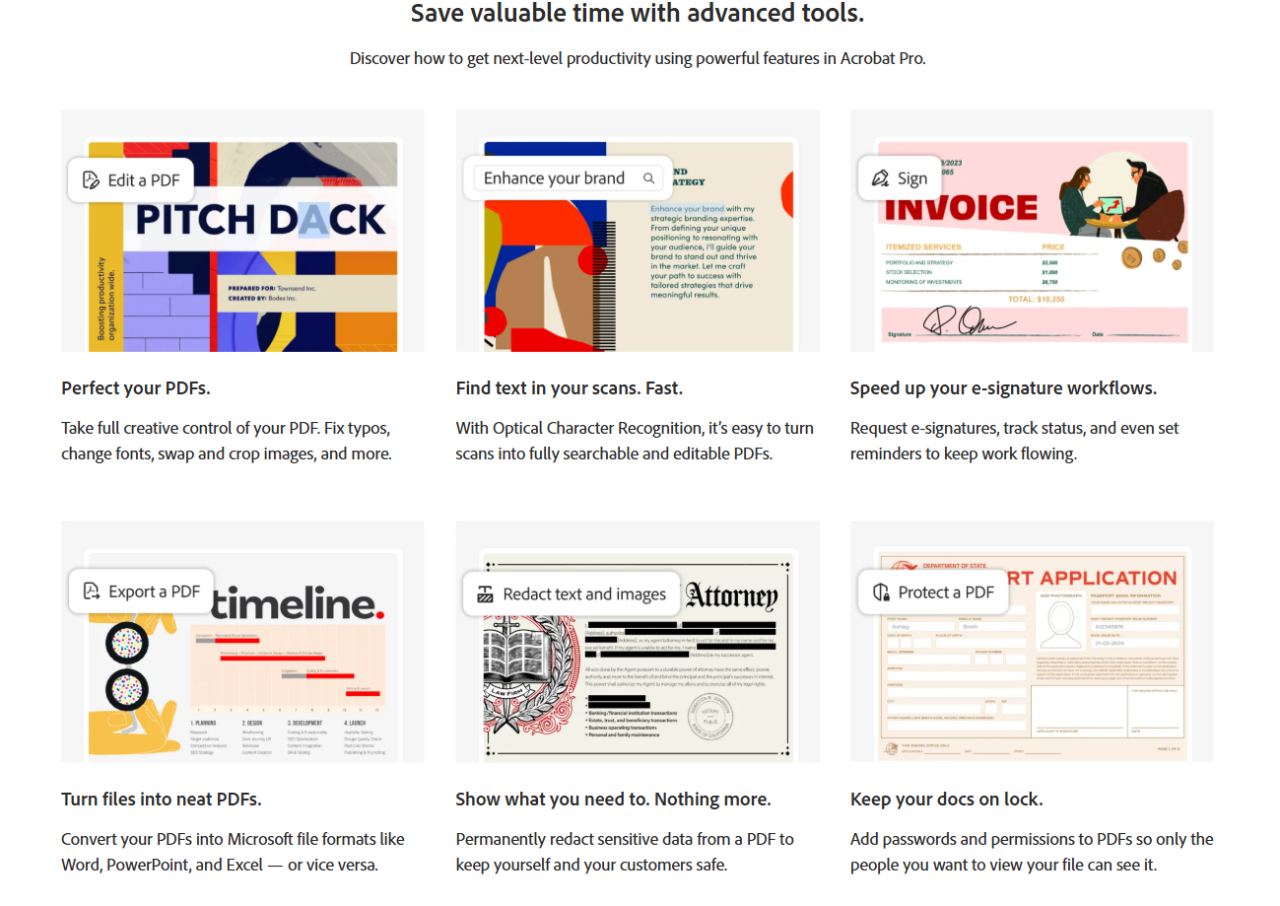
- Direct PDF Text, Image, Page & Vector Editing: Modifies paragraphs, fonts, images, headers, and page order directly inside existing PDFs—including technical reports, multi-page map books, and contracts—without rebuilding from scratch.
- Accurate OCR, Redaction & Side-by-Side Document Comparison: Converts scanned paper documents into selectable, searchable text via OCR, permanently redacts sensitive data, and highlights text or visual differences between two PDF revisions.
- Integrated E-Signatures, Forms & Cross-Device Access: Creates interactive fillable PDF/web forms, sends documents for tracked e-signatures, and syncs across Windows, macOS, web browsers, and mobile apps.
2. Key Features & Capabilities
- Direct Text & Image Editing in PDFs: Fix typos, reflow text blocks, swap or resize images, and adjust formatting directly on any PDF page.
- OCR Text Recognition for Scanned PDFs: Convert scanned documents, engineering drawings, and paper forms into searchable, editable PDFs or Microsoft Word, Excel, and PowerPoint files.
- Permanent Redaction & Security Permissions: Permanently black out confidential text or metadata and restrict printing, copying, or editing with password encryption.
- PDF Comparison & Page Organization: Merge, split, rotate, crop, number, and compare two PDF versions side by side to spot every change.
- Fillable Forms & Tracked E-Signatures: Build interactive forms and send agreements out for e-signature without requiring recipients to install paid software.
- Official 7-Day Free Trial & Flexible Plans: Available via a 7-day free trial from Adobe as a standalone Acrobat Pro subscription or bundled inside Creative Cloud Pro.
- Official Links: Free Trial, Free / Education & Pricing
Always download Adobe Acrobat Pro installers and start your official trial directly from Adobe portals:
- Official Adobe Acrobat Pro Product Page: https://www.adobe.com/acrobat/acrobat-pro.html
- Official Adobe Acrobat Pro 7-Day Free Trial: https://www.adobe.com/acrobat/free-trial-download.html
- Official Adobe Acrobat Plans & Pricing: https://www.adobe.com/acrobat/plans.html
- Official Adobe Acrobat User Guide & Tutorials: https://helpx.adobe.com/acrobat/user-guide.html
4. Step-by-Step Installation Guide
- Check Operating System & Hardware Requirements: Confirm your Windows 10/11 (64-bit) or macOS computer has at least 2 GB RAM (4 GB–8 GB+ recommended for large scanned PDFs) and an internet connection for Adobe ID activation.
- Start Your Official Trial or Sign In to Adobe: Visit https://www.adobe.com/acrobat/free-trial-download.html, click `Start free trial` or `Buy now`, and sign in with your Adobe ID.
- Download & Run the Official Acrobat Installer: Download the Windows or macOS installer (or install via the Creative Cloud desktop app) and follow the on-screen setup steps.
- Launch & Activate Adobe Acrobat Pro: Open Adobe Acrobat Pro, confirm your Adobe ID sign-in status, and set Acrobat Pro as your default PDF handler if desired.
5. How to Use Adobe Acrobat Pro: Beginner Workflow
- Open or Create a PDF Document: Launch Adobe Acrobat Pro and click `Open` to load an existing PDF, or choose `Create` to convert Word, Excel, image, or scanner inputs into a PDF.
- Edit Text, Images, or Page Order: Select `Edit` in the top toolbar to modify text or images directly, or open `Organize Pages` to reorder, rotate, insert, or delete pages.
- Run OCR on Scanned Documents: Open a scanned PDF, go to `Scan & OCR > Recognize Text > In This File`, select your document language, and click `Recognize Text` to make the document searchable and selectable.
- Protect, Redact, or Add Signatures: Use `Redact` to permanently remove sensitive details, `Protect` to apply password permissions, or `Request e-signatures` / `Fill & Sign` to sign documents.
- Export or Compress for Sharing: Save your master PDF (`File > Save As`), reduce file size (`Compress a PDF`), or export to Word/Excel (`Export a PDF`) for easy distribution.
6. Frequently Asked Questions (FAQ)
- Does Adobe Acrobat Pro offer a free trial?Yes. Adobe offers a 7-day free trial of Adobe Acrobat Pro for Windows, macOS, web, and mobile through Adobe.com.
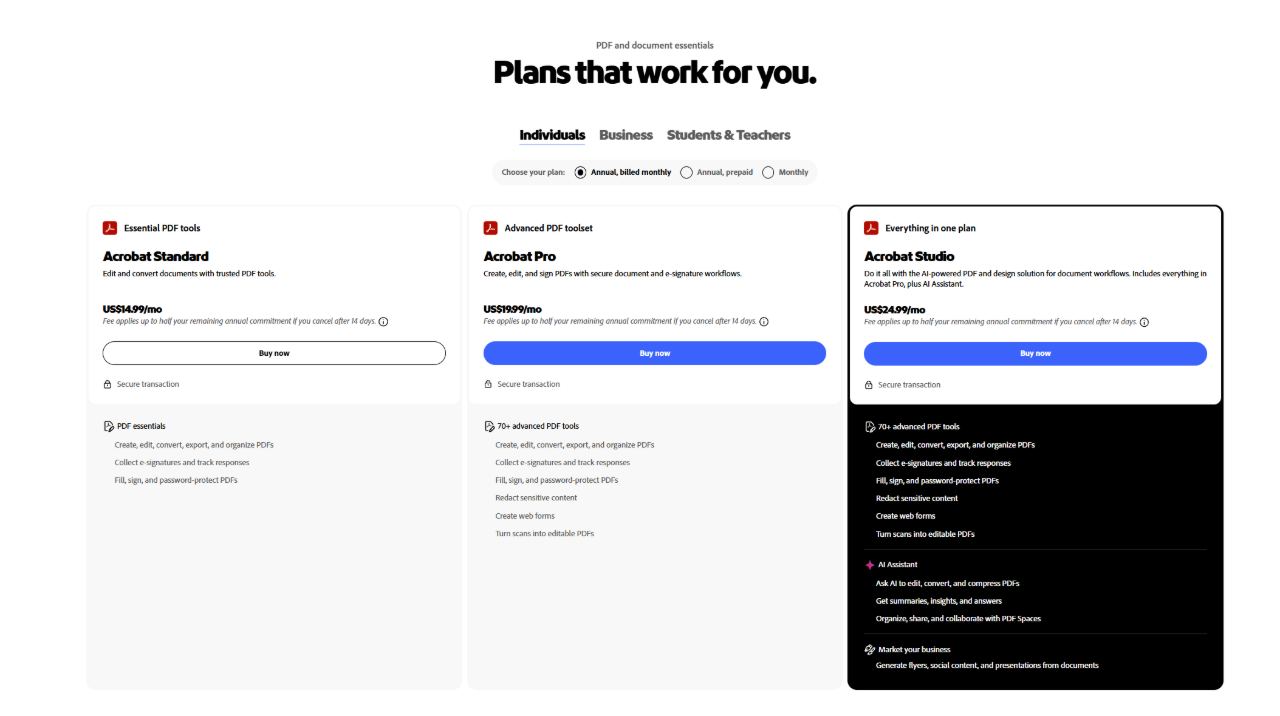
- How much does Adobe Acrobat Pro cost in 2026?In 2026, Adobe Acrobat Pro is priced at US$19.99/month on an annual plan billed monthly (US$239.88/year prepaid, or US$29.99/month month-to-month), with team and student/teacher pricing options also available.
- What is the difference between free Adobe Acrobat Reader and Acrobat Pro?Acrobat Reader is free for viewing, commenting, printing, and basic form filling/signing, whereas Acrobat Pro unlocks full text and image editing, OCR text recognition, permanent redaction, PDF version comparison, and conversion to Word/Excel/PowerPoint.